This
is assuming that the server drive or selected folder is shared and able to be accessed
through the network.
To
map a network drive on your Windows XP or XP Professional machine click “START”
then look to the top left and click on "My Network Places"
You
should be looking at a window similar to this:
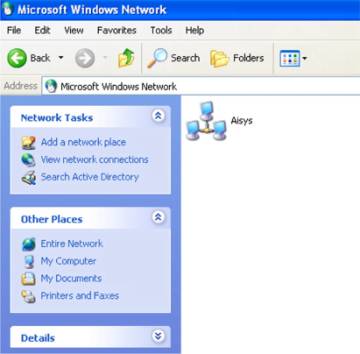
If you have “ENTIRE NETWORK” visible, and don’t see a workgroup,
click on “ENTIRE NETWORK”. When you see a workgroup, in this example
it is the “Aisys” icon, double click on the workgroup.
You
should now be looking at a window similar to this:
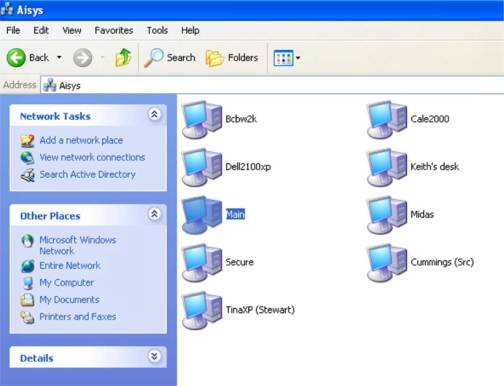
This
is a “view” of all the computers connected to the network. Locate your
server, in this example it is called “Main”. Right click the selected
server and choose “Map Network Drive”.
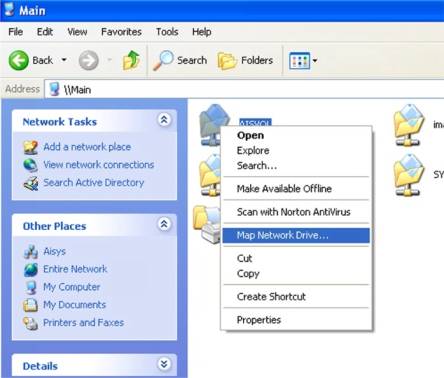
You will now see this window pop up:
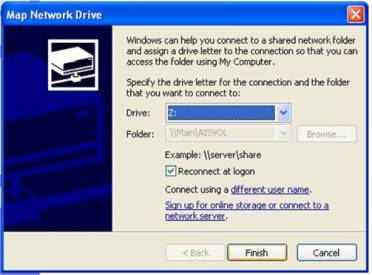
You now choose
a network drive letter. Your network drive letter should be one you can easily remember.
You will need to choose the path from the dropdown list if it is not already selected.
Next, be sure to check the reconnect at logon box and then click OK.
Written by: Tina Stewart
Back